
I’ve watched too many talented doctors in Queens lose patients to competitors with better websites.
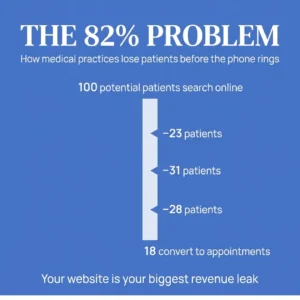
The data tells a clear story: 82% of patients research providers online before booking. They visit an average of 5.4 websites during their search. They read reviews, compare credentials, check your office location on Google Maps, and judge whether you’re worth their time.
Your website handles all of this before your front desk ever picks up the phone.
I built this checklist for doctors who want their websites to work as hard as they do. Each item addresses a specific conversion leak I’ve seen cost practices thousands in lost patient revenue. This is what separates practices that consistently attract new patients from those wondering why their phone stays quiet.
 Design & User Experience
 Design & User Experience
Your website has three seconds to make an impression. Patients judge how your practice will treat them based on how your digital presence treats them.
Here’s what I build into every medical practice website:
Mobile-first responsive design. 63% of medical searches happen on mobile devices. In Queens specifically, over 70% of local searches come from phones. Your website needs to load fast and function perfectly on a screen someone’s holding while walking down Steinway Street or waiting for the 7 train.
Clear navigation with maximum three clicks to any page. Patients shouldn’t need a map to find your phone number or book an appointment. I structure navigation around patient intent: Services, Insurance, Location, Contact. That’s it.
Fast load times under three seconds. Every additional second of load time costs you patients. Google prioritizes fast sites in search results. Patients abandon slow sites before they even see your content.
Accessible design meeting WCAG 2.1 AA standards. This isn’t just about compliance. Readable fonts, proper color contrast, and keyboard navigation make your site usable for everyone, including older patients and those with disabilities.
Professional photography showing your actual office and staff. Stock photos of models in lab coats signal that you’re hiding something. Real photos of your waiting room, exam rooms, and team build trust before the first appointment.
Essential Pages & Content
Every page on your site should answer a specific question patients ask during their research process.
Homepage with clear value proposition and primary call-to-action. Patients should understand what you do, who you serve, and how to book within five seconds of landing on your site. I position the phone number and “Book Appointment” button above the fold on every device.
About page featuring physician credentials, experience, and philosophy. This is where you differentiate yourself from the 47 other internists in Queens. Patients want to know where you trained, how long you’ve practiced, and what makes your approach different.
Services pages with detailed descriptions for each offering. Generic service lists don’t convert. I write specific pages for each service that explain what happens during the visit, what conditions you treat, and what patients can expect. “Primary Care” becomes “Comprehensive Primary Care for Queens Families: Annual Physicals, Chronic Disease Management, and Preventive Health.”
Insurance and payment information page. 46% of patients use their insurance plan’s directory to find doctors. List every plan you accept. Be specific about payment policies, whether you offer payment plans, and what patients should bring to their first visit.
Contact page with multiple ways to reach you. Phone number, email, contact form, office hours, and directions. I add a Google Map embed showing your exact location with nearby landmarks patients recognize.
New patient information and forms. Let patients download intake forms before their visit. This reduces wait times and signals that you respect their time.
Trust Signals & Social Proof
84% of patients check online reviews before choosing a provider. 51% read at least six reviews before feeling confident enough to schedule.
Your website needs to showcase this social proof.
Patient testimonials with full names and photos when possible. Anonymous reviews carry less weight. Real names and faces make testimonials credible. I position these strategically throughout the site, not buried on a separate testimonials page.
Star ratings displayed prominently. Displaying testimonials and star ratings can increase conversion rates by over 270%. I pull your Google reviews and display your average rating on the homepage.
Professional credentials, board certifications, and affiliations. Logos from recognized medical boards, hospital affiliations, and professional organizations build credibility. Display them clearly on your About page and footer.
Awards, recognition, or media mentions. If you’ve been featured in local news, won patient satisfaction awards, or published research, show it. These signals separate you from competitors.
Privacy policy and HIPAA compliance statements. Patients need to know their information is protected. I make privacy policies accessible but not intrusive.
Conversion Elements
Healthcare websites average conversion rates between 2% and 5%. The top 25% of medical practitioners achieve 20.4%.
The difference comes down to these elements:
Prominent phone number in header on every page. Make it clickable on mobile so patients can call with one tap. I use a contrasting color and larger font size so it stands out.
Online appointment booking system. Some patients prefer booking online, especially after hours. I integrate scheduling tools that sync with your practice management system and send automatic reminders.
Contact forms that are simple and functional. Every field you add reduces completion rates. I ask for name, phone, preferred appointment time, and reason for visit. That’s it.
Clear calls-to-action throughout the site. Every page should guide patients toward the next step. “Book Your Annual Physical,” “Call for Same-Day Appointments,” “Download New Patient Forms.”
Live chat or chatbot for after-hours inquiries. Patients research doctors at night. A simple chatbot that answers common questions and collects contact information captures leads when your office is closed.
Click-to-call buttons optimized for mobile. On mobile devices, every phone number should trigger the phone dialer with one tap. This removes friction from the booking process.
Local SEO Optimization
Google Business Profile optimization accounts for 36% of local SEO ranking factors. When someone in Queens searches for “primary care doctor near me,” Google shows a map with three listings before any website results.
You need to own one of those three spots.
Google Business Profile fully optimized and verified. Complete every section: business description, services, hours, photos, and attributes. Practices with complete profiles get seven times more clicks than incomplete ones.
Consistent NAP across all online directories. Your Name, Address, and Phone number must match exactly everywhere they appear online: your website, Google, Healthgrades, Zocdoc, insurance directories. Inconsistencies confuse search engines and hurt your rankings.
Location-specific keywords throughout your site. I don’t optimize for “primary care doctor.” I optimize for “primary care doctor in Astoria” or “family medicine in Forest Hills.” Practices that target too broad a geographic area make a critical mistake.
Embedded Google Map on contact page. This helps with local SEO and makes it easier for patients to find your office. I add detailed directions from major subway stops and parking information.
Local business schema markup. This is code that helps search engines understand your business type, location, hours, and services. It makes your practice eligible for rich results in search.
Citations in local directories and healthcare listings. I submit your practice information to Healthgrades, Vitals, WebMD, Zocdoc, and other medical directories. Each citation strengthens your local SEO.
Content Strategy
Practices with blogs get 4.8 times more inquiries than those without content marketing. Physician-authored content ranks 3.2 times higher than generic marketing copy.
Google wants to show patients content written by actual doctors.
Blog with regular health education articles. I help doctors create content that answers questions patients actually ask: “When should I see a doctor for chest pain?” “How do I know if my child needs antibiotics?” “What vaccines do adults need?”
Service pages with detailed, patient-focused descriptions. These aren’t just lists of procedures. I write comprehensive guides that explain conditions, treatment options, what to expect during visits, and when to seek care.
FAQ section addressing common patient questions. This reduces phone calls from patients asking basic questions and helps with SEO. Search engines love FAQ content because it matches how people search.
Physician bios that showcase personality and expertise. Patients want to know who you are beyond your credentials. I help doctors write bios that feel human while establishing authority.
Patient resources and educational materials. Downloadable guides, preparation instructions for common procedures, post-visit care instructions. This content serves patients and ranks in search results.
Technical SEO
54% of healthcare website traffic comes from organic search. Your website needs to meet technical standards that search engines require.
SSL certificate for secure HTTPS connection. Google penalizes sites without SSL certificates. Patients see “Not Secure” warnings on sites without HTTPS, which destroys trust immediately.
XML sitemap submitted to Google Search Console. This tells search engines which pages to index and how your site is structured. I submit updated sitemaps whenever we add new content.
Optimized page titles and meta descriptions. Every page needs a unique title and description that includes relevant keywords and encourages clicks. These appear in search results and directly impact your click-through rate.
Header tags structured properly for SEO and readability. H1, H2, H3 tags help search engines understand your content hierarchy. They also make your content scannable for patients.
Image optimization with descriptive alt text. Large images slow down your site. I compress all images without losing quality and add alt text that describes what’s in each image for accessibility and SEO.
Clean URL structure using descriptive slugs. yourpractice.com/primary-care-astoria performs better than yourpractice.com/page?id=1247. Clean URLs help search engines and patients understand what’s on each page.
Security & Compliance
Medical websites handle protected health information. Security isn’t optional.
HIPAA-compliant contact forms and data handling. Any form that collects patient information needs encryption and proper data storage. I use HIPAA-compliant form plugins and hosting environments.
Regular security updates and malware scanning. I monitor sites for vulnerabilities and apply security patches immediately. Hacked medical websites lose patient trust and face regulatory penalties.
Secure hosting with daily backups. Your website needs to be backed up daily and stored in multiple locations. If something goes wrong, I can restore your site within hours.
Privacy policy compliant with HIPAA and state regulations. New York has specific requirements for medical practice websites. I ensure your privacy policy covers all necessary disclosures.
Cookie consent and tracking disclosure. If you use analytics or advertising pixels, you need to disclose this and give patients control over their data.
Analytics & Tracking
You can’t improve what you don’t measure. I set up tracking that shows exactly how your website performs.
Google Analytics 4 properly configured. This shows you how many people visit your site, which pages they view, how long they stay, and where they come from.
Google Search Console for search performance monitoring. This reveals which search terms bring patients to your site, your average position in search results, and technical issues that need fixing.
Call tracking to measure phone conversions. I use tracking numbers that show which website pages or marketing campaigns generate phone calls. This connects your website investment to actual patient appointments.
Form submission tracking and goal conversion setup. Every time someone fills out a contact form or books an appointment, Google Analytics records it as a conversion. This shows your actual conversion rate.
Heatmaps showing user behavior and engagement. These visual tools show where patients click, how far they scroll, and where they lose interest. I use this data to optimize page layouts.
Integration & Functionality
Your website should connect with the tools you already use.
Integration with practice management system. Online appointments should flow directly into your scheduling system. Manual data entry wastes staff time and creates errors.
Patient portal access prominently featured. If you offer a patient portal for lab results, prescription refills, and messaging, make it easy to find and access from your website.
Email marketing integration for newsletters and updates. I connect your website to email platforms so you can build a list of patients who want health tips and practice updates.
Social media links to active profiles. If you maintain Facebook, Instagram, or LinkedIn profiles, link to them from your website. This gives patients additional ways to connect and see your practice personality.
Review request automation after appointments. The best time to ask for a review is right after a positive appointment. I set up automated emails that make it easy for satisfied patients to leave reviews.
Ongoing Maintenance
Websites require regular updates to maintain performance and security.
Regular content updates and blog posts. Search engines favor sites that publish fresh content regularly. I recommend at least one new blog post per month.
Quarterly review of analytics and performance. Every three months, I analyze your traffic, conversions, and search rankings. This reveals what’s working and what needs adjustment.
Software and plugin updates applied promptly. Outdated software creates security vulnerabilities. I apply updates as soon as they’re released and test to ensure nothing breaks.
Broken link checks and fixes. Links break over time as you update content or external sites change. I scan for broken links monthly and fix them.
Mobile responsiveness testing across devices. New phones and tablets launch constantly. I test your site on multiple devices to ensure it works everywhere.
Speed optimization and performance monitoring. Sites slow down as you add content. I monitor load times and optimize images, code, and hosting to maintain fast performance.
What This Means for Your Practice
Patient acquisition costs for primary care practices range from $150 to $400 per new patient. For specialists, costs run between $300 and $800.
Your website reduces these costs.
When patients find you through search instead of paid advertising, your acquisition cost drops to nearly zero. When your website converts 20% of visitors instead of 3%, you get more patients from the same traffic.
I’ve seen practices move from page two of Google to the Map Pack and experience measurable increases in appointment requests within 60 to 90 days. No increase in ad spend. Just better optimization.
The practices that consistently attract new patients treat their websites as critical infrastructure. They update content regularly. They monitor performance. They fix problems quickly.
Your competitors in Queens are doing this right now. The practices with optimized websites, complete Google profiles, and strategic content are capturing the patients who would otherwise call you.
This checklist gives you the framework to compete.
I help doctors in Queens turn their websites into patient acquisition tools through conversion-focused design and data-driven SEO. If you want to discuss how these strategies apply to your specific practice, reach out. I’m here to help you build a website that works as hard as you do.