
Your Medical Forms Are the Weakest Point on Your Website.
Here’s How to Fix Them.
TL;DR: Most medical practice websites have HIPAA violations hiding in plain sight, usually inside the intake forms patients fill out before their first appointment. A non-compliant form can cost a small practice $100,000 to $500,000 in penalties, and the fix takes days, not months.
- Any form collecting names, symptoms, insurance details, or medications is handling Protected Health Information (PHI) and falls under HIPAA.
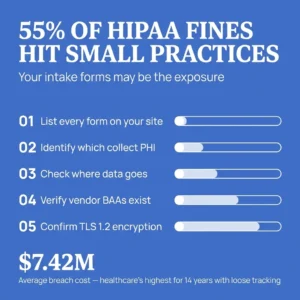
- 55% of HIPAA settlements in 2022 hit small practices, not large hospital systems.
- Most free form builders will not sign a Business Associate Agreement (BAA), which means they fail the compliance test by default.
- A missing risk assessment document is itself a HIPAA violation, even if your forms are technically secure.
- The average cost of a healthcare breach is $398 per exposed record. Fixing a non-compliant form costs a fraction of that.
 I design websites for doctors and private practices. When I audit a practice’s site, I check the intake forms first.
The forms are where patients hand over their most sensitive information. They’re also where I find the most compliance problems, every single time.
A contact form asking about symptoms. An appointment request collecting insurance details. A new patient packet embedded through a free form builder. Each of these collects Protected Health Information (PHI), and each one falls under HIPAA the moment it does.
Many practice owners assume their web developer handled this. In my experience, most developers never thought about it. Here’s what the numbers show, and what you can do about it.
Are Small Practices Really at Risk? (Yes, They’re the Target.)
There’s a persistent belief among solo practitioners that HIPAA enforcement only reaches large hospital systems.
In 2022, 55% of HIPAA settlements hit small practices. Penalties have landed in the $100,000 to $500,000 range for failures as simple as skipping a risk assessment or improperly disposing of patient records. Violation penalties now range from $141 to over $2.1 million per violation, according to penalty data updated for 2026.
Enforcement is intensifying, too. The Office for Civil Rights confirmed that in 2026 it will expand its risk analysis enforcement initiative to include risk management. Its Right of Access Initiative specifically targets smaller organizations, per HIPAA Journal.
⚠️ Warning: Regulators are actively looking at practices your size. Being small stopped being a shield years ago.
Key Point: Small practices make up the majority of HIPAA enforcement actions. Flying under the radar is no longer a realistic strategy.
How Big Is the Breach Problem in Healthcare?
In 2025, U.S. healthcare organizations reported 772 large breaches, exposing roughly 138.5 million records. That’s about 379,306 people’s health information exposed every single day, based on breach statistics reported to OCR.
The financial picture is just as serious. Healthcare’s average breach cost reached $7.42 million in 2025, the highest of any sector for 14 consecutive years. The average cost per exposed record is $398. The number of providers reporting over $200,000 in losses quadrupled between 2024 and 2025.
For a private practice, a single breach traced back to an insecure web form is financially devastating. The fine is only part of it. Legal costs, notification requirements, and lost patients pile on after that.
Key Point: 772 breaches in one year, at $398 per exposed record. The financial exposure from a single insecure form is real and measurable.
Why Does HIPAA Compliance Affect Patient Acquisition?
I build websites to bring patients through the door. Compliance and conversion are connected more tightly than most practice owners realize.
Nearly 75% of patients are concerned about the privacy of their personal health data. At the same time, 83% of patients trust their own doctors to protect their medical records, according to an AMA patient survey.
That trust extends to your website before patients ever meet you in person. A breach breaks it publicly. Breach notifications go to every affected patient, and in a local market, word moves fast. Your website stops working as a patient acquisition tool when it’s the reason patients left.
💡 Tip: Secure forms convert better. Patients hesitate before typing health details into a form that looks generic or untrustworthy. Visible security signals reduce that hesitation and improve your intake completion rate.
Key Point: Patient trust is your most valuable acquisition asset. Insecure forms put it at risk before the first appointment is ever booked.
What Actually Makes a Medical Form HIPAA-Compliant?
Any form that collects, transmits, or stores PHI needs to meet these requirements. Here’s what each one means for your practice specifically.
01. Encryption in Transit and at Rest
PHI must be encrypted with TLS 1.2 or higher during transmission. Data sitting in storage needs encryption, too. Your form data travels from the patient’s browser to your systems, and every stop along that route needs protection.
02. A Business Associate Agreement With Your Form Vendor
If a third party touches your form data, you need a signed Business Associate Agreement (BAA) with them. This includes your form builder, your email provider, and your hosting company. No BAA means no compliance, regardless of how secure the technology is. Most free form tools will not sign one.
03. Audit Logs
You need a record of who accessed patient data and when. Compliant form systems maintain these logs automatically. No audit trail means no way to prove proper handling during an investigation.
04. Access Controls
Form submissions should reach only the staff who need them. A shared inbox that the whole office checks fails this test. Assign access by role and remove it when someone leaves.
05. A Documented Risk Assessment
This is where practices fail most often, and it’s the one that surprises people. HIPAA requires a thorough assessment of risks to the confidentiality, integrity, and availability of electronic PHI. The risk assessment is a living document. You must update it whenever your environment changes, and adding a new web form qualifies as a change.
Key Point: All five requirements have to be in place together. Meeting four out of five still leaves you exposed.
How to Audit Your Own Forms This Week
You can check most of this yourself in an afternoon.
- List every form on your website. Contact forms, appointment requests, patient portals, newsletter signups that ask health questions. All of them.
- Identify which ones collect PHI. Names combined with health information, insurance details, symptoms, medications. If a form touches any of it, it’s in scope.
- Check where the data goes. Follow each submission through its full path. Email inbox, third-party dashboard, spreadsheet. Every destination needs to be secure and covered by a BAA.
- Verify your vendor agreements. Pull up your contracts with your form provider and host. Confirm a signed BAA exists for each one.
- Confirm encryption. Look for HTTPS on every page that has a form. Ask your vendor to confirm TLS 1.2 or higher and encryption at rest.
- Document what you found. Add the results to your risk assessment. If you have no risk assessment, start one now. Regulators treat the missing document itself as a violation.
Key Point: This audit takes a few hours. A breach investigation takes months and costs far more.
What Should You Do If Your Forms Fail the Audit?
Start with the highest-risk form and fix it first. That’s usually the one collecting the most detailed health information through the least secure channel.
Replacing a non-compliant form takes days. Recovering from a breach takes years. The fix is far cheaper than $398 per exposed record, and compliant solutions exist at price points small practices can afford.
The switch typically involves choosing a HIPAA-compliant form vendor, signing the BAA, rebuilding your forms, and updating your risk assessment. Done properly, your patients notice nothing except a more professional experience.
Key Point: The remediation process is straightforward. Most practices can close their biggest compliance gaps within a week.
Your Website Should Earn Patient Trust, Then Protect It
I help doctors turn their websites into consistent patient acquisition tools. Secure forms sit at the foundation of that work.
Every patient who fills out your intake form is extending the same trust they’d give you in the exam room. Your job is to make sure the technology behind that form deserves it.
Run the audit. Check your BAAs. Update your risk assessment.
If you’re unsure whether your forms pass, get them reviewed before a regulator or a breach does it for you. I’m here to help you figure out where you stand.
Frequently Asked Questions
Does HIPAA apply to my website contact form?
Yes, if that form collects any PHI. A name combined with a health condition, a symptom, a medication, or an appointment reason qualifies. Standard contact forms asking only for name and email generally fall outside scope, but the moment a health detail appears, HIPAA applies.
Can I use Google Forms or Typeform for patient intake?
Google Forms and Typeform do not offer a Business Associate Agreement on their free or standard plans, which means they fail the HIPAA compliance test by default. There are HIPAA-compliant alternatives built specifically for healthcare intake that handle the BAA, encryption, and audit logging requirements.
What is a Business Associate Agreement (BAA), and why do I need one?
A BAA is a signed contract between your practice and any vendor that handles PHI on your behalf. It establishes each party’s responsibility for protecting that data. Without a BAA in place, your practice is legally exposed even if the vendor’s technology is secure.
How often does my risk assessment need to be updated?
HIPAA requires updates whenever there is a meaningful change to your environment. Adding a new web form, switching vendors, onboarding a new staff member with data access, or changing your hosting setup all trigger an update requirement. An annual review is a reasonable baseline even without changes.
What happens if a patient’s information is exposed through my website form?
You’re required to notify affected patients, report the breach to HHS, and in many cases notify local media if the breach affects 500 or more people in a state or jurisdiction. Penalties can reach into the hundreds of thousands of dollars, and the reputational damage in a local patient market compounds the financial cost.
Is HTTPS enough to make my forms HIPAA-compliant?
HTTPS confirms encryption in transit, which covers one of the five requirements. Audit logs, access controls, a signed BAA, and a documented risk assessment are still required. HTTPS is necessary but not sufficient on its own.
How long does it take to fix a non-compliant form?
Switching to a HIPAA-compliant form solution typically takes a few days once you’ve selected a vendor. Signing the BAA, rebuilding the forms, and updating your risk assessment are the main steps. More complex setups with custom integrations may take longer.
Can I check compliance myself, or do I need a specialist?
The six-step audit above covers the basics and is designed for non-technical practice owners. For practices with complex workflows, multiple intake touchpoints, or prior violation history, a specialist review adds an important layer of protection. I offer a review as part of the web design work I do with medical practices.
Key Takeaways
- Any web form that collects PHI falls under HIPAA, including basic contact and appointment forms.
- Small practices make up the majority of HIPAA enforcement actions. Practice size is not a protection.
- A signed Business Associate Agreement with every vendor that touches patient data is a hard requirement. Most free tools will not sign one.
- A missing risk assessment document is itself a HIPAA violation, separate from any form security issues.
- The average breach costs $398 per exposed record. Fixing a non-compliant form costs significantly less.
- Secure, professional-looking forms improve patient trust and intake completion rates, making compliance a conversion asset, not just a legal requirement.
- The self-audit process takes an afternoon. It’s the fastest way to find out where your practice stands before a regulator does.